
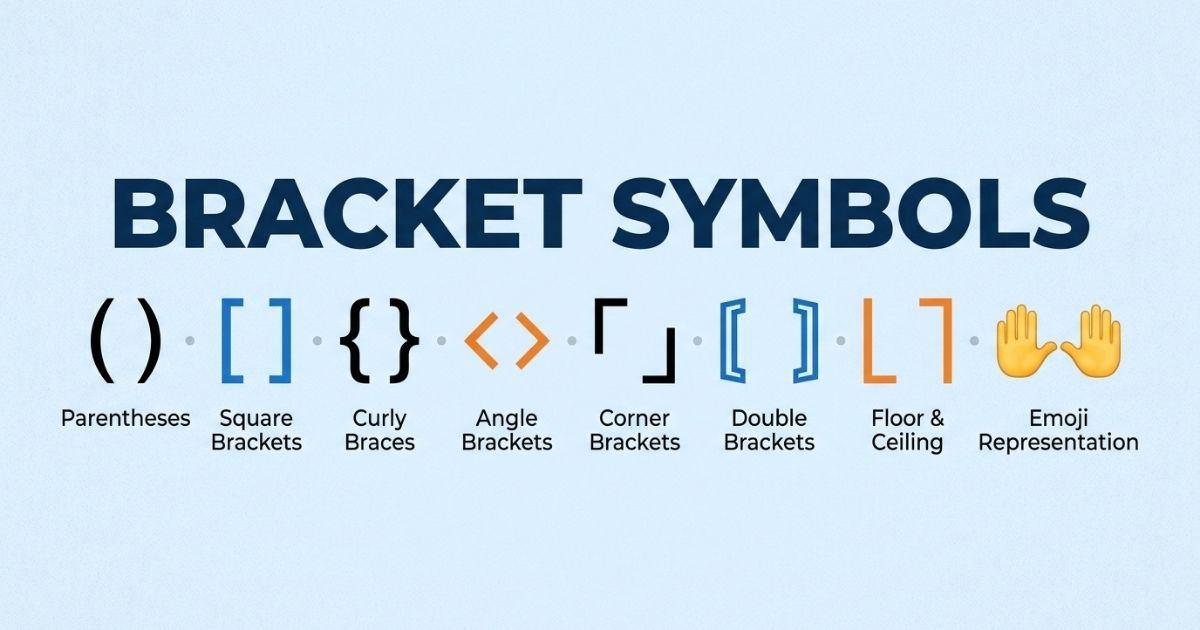

Brackets are small marks with a big job. They group text, frame a thought, and add style to a username or bio. Most people only know the basic ones on a keyboard.
There is a whole universe of bracket symbols beyond that. Curly ones, Japanese ones, fancy ones, and even bracket-shaped emoticons all exist in Unicode.
This guide brings every useful bracket symbol into one place. Copy any symbol below and paste it directly into your bio, chat, or design project.
Bracket Symbols Names
Each bracket type has an official name, and knowing it helps when searching for the right symbol. Below is a quick reference table.
| Symbol | Common Name | Also Known As |
| ( ) | Parentheses | Round brackets |
| [ ] | Square brackets | Box brackets |
| { } | Curly brackets | Braces |
| < > | Angle brackets | Chevrons |
| 〈 〉 | Angle brackets (CJK) | Math angle brackets |
| 「 」 | Corner brackets | Japanese quotation marks |
| 『 』 | White corner brackets | Japanese double quotation |
| ⦅ ⦆ | Fullwidth white parenthesis | Ornamental brackets |
Names differ slightly by region and industry. Coders say braces for curly brackets, while writers usually call them curly brackets or curly braces.
In British English, “brackets” often refers only to square brackets [ ], while parentheses are called “round brackets.” In American English, “brackets” is the umbrella term for all bracket types.
Knowing the correct name also helps when searching a Unicode chart or a keyboard symbol viewer. Typing “angle bracket” returns different results than typing “chevron,” even though both point to a similar shape.
- Parentheses: used for asides and extra detail
- Square brackets: used for edits inside quotes
- Curly brackets: used for sets and code
- Angle brackets: used for tags and comparisons
Each name also maps to a specific Unicode code point, which matters for developers who need the exact character rather than a visually similar substitute.
You can also explore: Sparkle Emojis & Symbols
Curly Bracket Symbol
The curly bracket, or brace, looks like this: { }. It is one of the most recognized bracket styles because of its heavy use in programming.
Curly brackets group code blocks in languages like JavaScript, C++, and Java. Outside coding, they appear in math to denote sets, such as {1, 2, 3}.
Here are some copy-ready curly bracket variants:
- { }
- { } (fullwidth curly bracket)
- ⦃ ⦄ (heavy curly bracket)
- ❴ ❵ (medium curly bracket)
Fullwidth curly brackets are popular in stylish usernames because they look wider and bolder on screen than the standard keyboard version.
Curly brackets also carry meaning in specific fields. In set theory, {x} means a set containing the single element x. In regular expressions, {2,4} sets a repetition range for a pattern.
- Programming: groups a function or loop body
- Math: denotes a set of numbers or objects
- Writing: rarely used, but sometimes marks an aside within an aside
- Design: used purely for visual framing on social media
Because curly brackets are so tied to code, using them in a bio or username gives off a slightly techy, developer-coded aesthetic that plain parentheses do not carry.
Stylish Bracket symbol
Stylish brackets add flair to text without needing any image editing tool. They work well around usernames, titles, or a single keyword you want to highlight.
Some widely used stylish bracket symbols:
- 【 】
- ✦❃✦
- ᴥ ᴥ
- ᐧ ᐧ
- ⌈ ⌉
- ⌊ ⌋
- 『 』
- « »
These symbols come from Unicode blocks originally built for typography, math, or East Asian scripts, but the internet has repurposed them purely for style.
A simple trick is to wrap a name or word with a matching pair, like 【Alex】 or «Alex». This instantly makes plain text stand out in a bio or display name.
Stylish brackets work best when used sparingly. Wrapping every single word on a profile in symbols reduces readability and can look cluttered rather than polished.
- Pick one bracket style and stay consistent across a profile
- Use bold or heavy brackets for a single standout word only
- Match the bracket style to the platform, since gaming apps favor bold shapes while professional profiles favor thin ones
- Avoid mixing three or more different bracket styles in one line
A good rule is to treat brackets like punctuation in design, meaning they should support the text, not compete with it for attention.
You can also explore: Music Emojis, Symbols, Emoticons & Kaomojis
Aesthetic Brackets and Combos
Aesthetic bracket combos mix symbols, spacing, and small decorative marks to build a mini design. These are common in Instagram bios, Discord nicknames, and TikTok captions.
The goal of a combo is balance. A strong combo pairs one bracket shape with one or two small accent marks, rather than stacking several unrelated symbols together.
Below are the four most searched combo types, each with a copy-ready list.
Bracket Emojis Copy and Paste
True bracket emojis are limited since Unicode treats most brackets as text symbols, not emoji. However, some emoji-style symbols mimic bracket shapes and pair well with them.
- 📎 【 】📎
- 🔖 「 」🔖
- ✨ 『 』✨
- 🎀 ❴ ❵ 🎀
Pairing a small emoji with a bracket symbol gives a soft, decorated frame without looking cluttered.
A helpful habit is to pick an emoji that matches the theme of the bio or caption. A travel account might pair brackets with 🌍, while a study account might pair them with 📚, keeping the whole profile visually cohesive.
Bracket Symbols Copy and Paste
This is a ready list of plain bracket symbols for quick copying, with no extra decoration attached.
- ( )
- [ ]
- { }
- 〈 〉
- ⟨ ⟩
- ⟦ ⟧
- ⟪ ⟫
- ⦋ ⦌
- ⦇ ⦈
- ⦉ ⦊
Each pair renders consistently across most modern apps and websites, including Instagram, Discord, and Twitter or X.
For anyone building a longer design, mixing a rounded bracket with a sharp one, such as ⟨ text ⟩ next to [ text ], creates contrast without clashing, since both belong to the same visual family of line-based brackets.
Bracket Emoticons Copy and Paste
Emoticons built from brackets use keyboard characters to form quick, expressive faces or shapes. They differ from kaomojis, which usually include more detail.
- :[ (sad face variant)
- :] (simple smile)
- [: (mirrored smile)
- ]:) (mischief face)
- [-_-]
These work well in casual chats where a full kaomoji feels too long for the tone of the conversation.
Bracket emoticons date back to early internet forums and instant messaging apps, long before emoji existed. They remain useful today because they type fast and need no special keyboard.
Bracket Kaomojis Copy and Paste
Kaomojis are Japanese-style emoticons that use brackets as the face outline. They read upright, unlike Western emoticons that tilt sideways.
- ( ͡° ͜ʖ ͡°)
- (づ。◕‿‿◕。)づ
- ლ(╹◡╹ლ)
- 【=◈︿◈=】
- (。◕‿◕。)
- ヽ(°〇°)ノ
Kaomojis are popular on Discord and Twitter because they carry emotion and personality in plain text, with no image needed.
Most kaomojis follow a simple structure: a bracket or symbol on each side, with eyes and a mouth built from smaller characters in the middle. Once that pattern is clear, it becomes easy to recognize and even build custom ones.
- Left bracket, or arms, such as ( or ヽ
- Eyes, such as ° or ◕
- Mouth, such as ‿ or ﹏
- Right bracket, or arms, mirroring the left side
This structure explains why kaomojis feel more expressive than simple emoticons. They mimic an entire face and posture, not just a mouth shape.
You can also explore: Fish Symbols & Emojis
Bracket Categories
Bracket symbols fall into a few clear categories based on origin and use case. Sorting them this way makes it easier to find the right one for a specific project.
Each category below serves a different purpose, from strict formal writing to loose creative decoration, so picking the right one depends entirely on the platform and the goal.
Basic & Standard Brackets
These are the brackets found on almost every keyboard layout worldwide. They are the safest choice for formal writing or code.
| Bracket | Name | Typical Use |
| ( ) | Parentheses | Extra info in a sentence |
| [ ] | Square brackets | Citations, edits in quotes |
| { } | Curly brackets | Code blocks, sets |
| < > | Angle brackets | HTML tags, comparisons |
Standard brackets always display correctly, since they are part of the basic ASCII character set supported by every device.
These four pairs cover roughly 95 percent of everyday bracket use. Anyone writing an email, essay, resume, or piece of code will rely on this basic set almost exclusively.
Because they are universal, standard brackets are also the safest choice for accessibility. Screen readers and older software handle them reliably, unlike some rarer Unicode bracket shapes.
Japanese & Asian Aesthetic Brackets
These brackets originate from Japanese, Chinese, and Korean typography. They carry a clean, minimal look that many creators borrow for social media.
- 「 」 corner brackets
- 『 』 white corner brackets
- 【 】 black lenticular brackets
- 〔 〕 tortoise shell brackets
- 〖 〗 white tortoise shell brackets
- 〈 〉 angle brackets
Japanese corner brackets, 「 」, are technically quotation marks in Japanese writing, but online they are used purely as decorative frames.
This category has grown fast in popularity because of anime, manga, and J-pop fan culture spreading across social platforms worldwide. Many users adopt these brackets without knowing their original linguistic function, simply because the shapes look clean and minimal.
- 「 」 signals a quiet, minimal aesthetic
- 【 】 signals a bold, attention-grabbing frame
- 〔 〕 signals a softer, rounded feel
- 〈 〉 signals a sharp, modern look
Picking the right one often comes down to how bold or subtle a profile wants to appear.
Fancy & Decorative Braces
Decorative braces are pulled from mathematical and typographic Unicode blocks. They look ornate and work best for short highlighted text.
- ❨ ❩
- ❪ ❫
- ❬ ❭
- ❮ ❯
- ❰ ❱
- ⁅ ⁆
These braces are heavier and rounder than standard parentheses, giving text a softer, more designed appearance.
Decorative braces work particularly well for headings inside a document, thumbnail text, or a single-word highlight in a caption, since their weight naturally draws the eye more than a thin standard parenthesis would.
Math & Technical Delimiters
Technical delimiters come from mathematics and computer science. They matter most for writers, students, and developers working with formulas or notation.
- ⌈ ⌉ ceiling function
- ⌊ ⌋ floor function
- ⟦ ⟧ semantic brackets, used in formal logic
- ⟨ ⟩ inner product or tuple notation
- ‖ ‖ norm delimiters, technically not brackets but often grouped with them
Using the correct technical delimiter matters in academic writing, since swapping ⌈ ⌉ for regular parentheses can change the meaning of an equation.
| Delimiter | Field | Meaning |
| ⌈ ⌉ | Mathematics | Round up to the nearest integer |
| ⌊ ⌋ | Mathematics | Round down to the nearest integer |
| ⟦ ⟧ | Logic and programming | Formal semantic evaluation |
| ⟨ ⟩ | Physics and linear algebra | Vector or inner product notation |
Students and researchers should always confirm the exact symbol required by their citation style or software, since visually similar brackets can trigger formatting or calculation errors.
Trending & Popular Bracket Collections
Certain bracket combinations trend across platforms because they match a visual theme, like kawaii, gothic, or gaming culture.
Trends shift by season and platform, but the three collections below have stayed consistently popular across Discord, Roblox, and short-video apps.
Soft & Kawaii Brackets
Kawaii brackets pair soft shapes with pastel-style symbols. They suit cute usernames, aesthetic Pinterest boards, and kawaii-themed Discord servers.
- ˚₊‧ ⌗ ‧₊˚
- ✧⚝✧
- 。⋆。⋆《 》⋆。⋆
- ღ『 』ღ
- ˚ ༘ ⋆。 【 】 ˚ ༘ ⋆。
Kawaii brackets often combine small stars, hearts, or dots with a plain bracket pair to build a layered, gentle look.
This style works best with soft pastel color themes and rounded fonts, so it appears most often on aesthetic Pinterest boards, VSCO profiles, and cute Discord servers built around a specific fandom or hobby.
Gothic & Dark Brackets
Gothic brackets use sharp, heavy, or angular symbols. They fit horror-themed profiles, dark academia aesthetics, or edgy gaming tags.
- ⁂〖 〗⁂
- ✞ 『 』 ✞
- ⛧ ❰ ❱ ⛧
- ꧁『 』꧂
- 卂 匚 匚
The ꧁ ꧂ combo, common on gaming platforms, comes from the Javanese Unicode block but has been fully adopted for a dark, dramatic username style.
Gothic bracket styles pair naturally with black and red color schemes, sharp fonts, and dark academia or horror-themed content, since the jagged shapes echo those visual themes.
Discord Server (Bracket Style)
Discord server names and channel names often use bracket symbols to organize categories or draw attention to important channels.
- 『 announcements 』
- ⌈ rules ⌉
- 【 general-chat 】
- ▬▬ 「 events 」 ▬▬
- ✧ welcome ✧
A consistent bracket style across all channel names keeps a Discord server looking organized and intentional rather than random.
Server admins often assign a different bracket to each category, such as 『 』 for text channels and ⌈ ⌉ for voice channels, so members can identify a channel type before even reading the label.
- Use one bracket type per category, not per channel
- Keep emoji count low so channel names stay readable on mobile
- Match the bracket style to the server theme, whether that is gaming, study, or art
Creative Usage Examples of Bracket Symbols
Brackets are not just decoration. They serve a real purpose across platforms by framing names, separating sections, and guiding a reader’s eye.
The examples below show how the same bracket concept adapts to seven different platforms, each with its own space limits and audience expectations.
Instagram Bio Frame
Bio space is limited, so brackets help separate a name, tagline, and links without wasting characters on extra words.
Example layout:
『 Aria 』
✧ photographer ✧
【 links below 】
Keeping the same bracket pair across all three lines, rather than mixing several styles, makes the bio look intentional rather than randomly decorated.
TikTok Caption Decoration
Captions with a bracket-framed keyword get more visual weight, which helps a keyword stand out in a fast-scrolling feed.
Example:
new routine 【day 1】 let’s go
For a series like a daily routine or a countdown, updating just the number inside the brackets each post keeps the caption format instantly recognizable to returning viewers.
Discord Channel Name
Channel names benefit from a short, consistent bracket to signal category type at a glance.
Example:
⌈ voice-chat ⌉
「 memes 」
Short, lowercase channel names inside a light bracket read cleanly on both desktop and mobile Discord layouts, where sidebar space is limited.
Professional Portfolio/Linktree
Even professional layouts can use a single, subtle bracket pair to separate a name from a title, keeping the tone clean rather than casual.
Example:
Sarah Chen [ UX Designer ]
Recruiters and clients scan portfolios quickly, so a single restrained bracket around a job title helps it stand out without looking unprofessional.
Facebook Post Designs
Facebook posts with a bracket-highlighted word or date tend to get more attention in a crowded feed.
Example:
【SALE】 ends this Sunday
Bold brackets like 【 】 combined with capital letters make small business announcements easier to spot while scrolling through a busy Facebook feed.
Snapchat Bio Layouts
Snapchat bios are short, so a single bracket pair around a nickname or mood keeps the layout tidy.
Example:
✦『 Mia 』✦
Snapchat display names show up small next to a profile photo, so a light bracket with one accent symbol on each side keeps the name legible without overcrowding it.
Roblox About Layouts
Roblox profile descriptions often use brackets to list stats, socials, or a short bio line in a structured way.
Example:
⌈ Level 42 ⌉
⌈ Trading: Yes ⌉
Using the same bracket for every line of stats turns a plain about section into a scannable list, which is especially useful for trading and roleplay communities on Roblox.
Across all seven examples, the same core rule applies: one bracket style per section, used consistently, communicates more than several styles used at random.
Frequently Asked Questions
What is the difference between brackets and parentheses?
Parentheses are the round ( ) symbols specifically, while brackets is a broader term covering square, curly, and angle shapes too.
Can I use bracket symbols on any device?
Standard brackets work everywhere, but some fancy Unicode brackets may not render on very old devices or software.
Are bracket kaomojis different from emoticons?
Yes, kaomojis are more detailed and read upright, while emoticons are simpler and often read sideways.
Why do gamers use brackets like ꧁ 『 』 ꧂ in usernames?
These symbols make a username visually distinct and are widely recognized as a stylish gaming tag format.
Do search engines read text inside bracket symbols?
Yes, search engines index the text, but heavy use of unusual symbols can sometimes affect readability and SEO clarity.
Is it safe to copy bracket symbols from any website?
Yes, Unicode symbols are just text characters and carry no security risk when copied and pasted.
Which brackets are best for a professional bio?
Simple square brackets [ ] or single corner brackets 「 」 look clean and appropriate for professional profiles.
Final Thoughts
Bracket symbols turn plain text into something with structure and personality. From basic parentheses to gothic Unicode combos, there is a bracket style for every platform and mood.
Start with the category that matches your goal, whether that is a clean professional look or a bold kawaii theme. Copy, paste, and adjust the spacing until it feels right.
Small details like these add up, and a well-placed bracket pair can be the difference between a bio that blends in and one that stands out.
Keep this guide bookmarked as a quick reference whenever a new bio, caption, or channel name needs a finishing touch. A single bracket symbol, chosen with intention, does more work than a paragraph of extra text ever could.

Hi, I’m Ethan Brooks, the admin of SymbolHubz.com. Passionate about symbols, emojis, kaomojis, and text art, helping users discover creative ways to express themselves online.